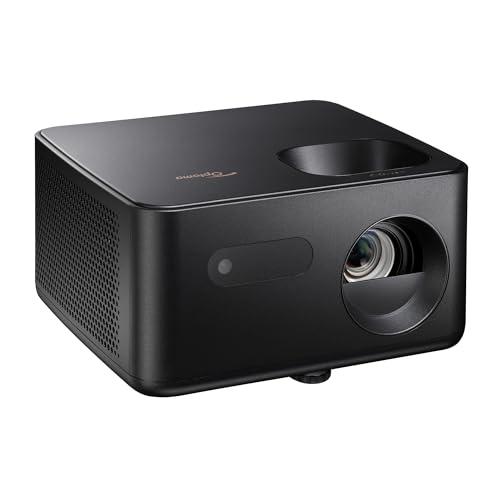
Optoma Photon Life PK31: Specs, Throw Distance & Alternatives
A 4K UHD DLP projector with an RGB LED light source. Optoma rates it at 900 ISO lumens and 4.6 ms input lag at 1080p/240, and ProjectorReviews measured 17.0 ms at 4K/60. It has one HDMI 2.0 input, no smart TV system or wireless, and no lens shift.

Is the Optoma Photon Life PK31 right for you?
Good for
- Console gaming at 4K/60 (rated 16 ms) or 1080p/120 (rated 8 ms)
- High-refresh PC gaming at 1080p/240 (rated 4.6 ms)
- HDR10 and HLG content
- Easy to move at 5.2 lb, with a 5 W built-in speaker
What to plan for
- No built-in streaming or wireless: add a streaming stick (ProjectorReviews says the USB-A port can power one)
- One HDMI 2.0 input, so 4K is limited to 60 Hz and there is no eARC or ARC
- Low Latency mode turns off keystone and geometry correction; the 33.8 ms measured at 4K/60 applies with it off
- No lens shift and manual focus, so placement has to be planned
- Light source life is published for Eco mode only (30,000 hours)
Based on manufacturer specifications and published reviews (sources below). We don't do hands-on testing.
Optoma Photon Life PK31 specs
| Resolution | 4K UHD (3840 × 2160, 0.47-inch DLP XPR pixel shift) |
|---|---|
| Brightness | 900 ISO lumens (Optoma rating; ProjectorReviews measured 862 in Bright mode) |
| Display technology | DLP |
| Light source | RGB LED |
| Light source life | 30,000 hours (Eco mode, Optoma rating) |
| Contrast ratio | 200,000:1 dynamic (Optoma rating) |
| Throw ratio | 1.50-1.65:1 |
| Lens shift | None (1.1x manual zoom; vertical offset 105% ±3%) |
| Max refresh rate | 240 Hz |
| HDMI ports | 1 (HDMI 2.0) |
| Speakers | 5 W |
| Weight | 5.2 lb |
How far from the screen?
Lens-to-screen distance for a 16:9 image, calculated from its 1.50-1.65:1 throw ratio. The zoom lets you place it anywhere in the range.
| Screen | Closest | Farthest |
|---|---|---|
| 80″ | 8' 9" | 9' 7" |
| 100″ | 10' 11" | 12' 0" |
| 120″ | 13' 1" | 14' 5" |
| 150″ | 16' 4" | 18' 0" |
Optoma Photon Life PK31 input lag by mode
| Signal | Input lag |
|---|---|
| 4K / 60 Hz | 16 ms |
| 1080p / 60 Hz | 16 ms |
| 1080p / 120 Hz | 8 ms |
| 1080p / 240 Hz | 4.6 ms |
Source: Optoma’s published ratings; ProjectorReviews measured 17.0 ms at 4K/60, 8.9 ms at 1080p/120 and 4.5 ms at 1080p/240 with Low Latency on (33.8 ms at 4K/60 with it off). Its fastest figure (4.6 ms at 1080p / 240 Hz) is quicker than 74 of the 96 projectors with a lag figure in our input lag database, which lists each model's fastest mode.
Where it fits
Optoma Photon Life PK31 FAQ
- How far from the screen should the Optoma Photon Life PK31 be for a 100-inch image?
- Between 10' 11" and 12' 0" from lens to screen, depending on the zoom setting (throw ratio 1.50-1.65:1).
- What is the input lag of the Optoma Photon Life PK31?
- 4K / 60 Hz: 16 ms; 1080p / 60 Hz: 16 ms; 1080p / 120 Hz: 8 ms; 1080p / 240 Hz: 4.6 ms. Source: Optoma’s published ratings; ProjectorReviews measured 17.0 ms at 4K/60, 8.9 ms at 1080p/120 and 4.5 ms at 1080p/240 with Low Latency on (33.8 ms at 4K/60 with it off).
- Is the Optoma Photon Life PK31 native 4K?
- No. Its resolution is 4K UHD (3840 × 2160, 0.47-inch DLP XPR pixel shift). It builds the 4K image with pixel shifting instead of a native 3840 × 2160 chip or panel.
- Does the Optoma Photon Life PK31 have lens shift?
- No. It has no lens shift and a 1.1x manual zoom with a fixed vertical offset of 105% ±3%, so the image position is set by where the projector sits.
Sources
- Optoma Photon Life PK31 product page
- ProjectorCentral: Optoma Photon Life PK31
- ProjectorReviews: Optoma Photon Life PK32 and PK31 review
Price, stock and rating come from Amazon and update automatically (last checked Nov 15, 2026, 12:01 AM).
Disclosure: As an Amazon Associate we earn from qualifying purchases. We also participate in the eBay Partner Network. We may earn a commission when you click through an affiliate link and make a purchase, at no extra cost to you. Prices and availability shown are accurate as of the time posted but are subject to change. Any price and availability information displayed at the time of purchase will apply.